Skip to content
Mbox Viewer Pro

mboxShell

The free terminal tool behind Mbox Viewer. Open, search and export MBOX files of any size — right from your shell, on Linux, macOS, FreeBSD and Windows.

Latest v0.7.3 Free & open source Written in Rust MIT
mboxshell
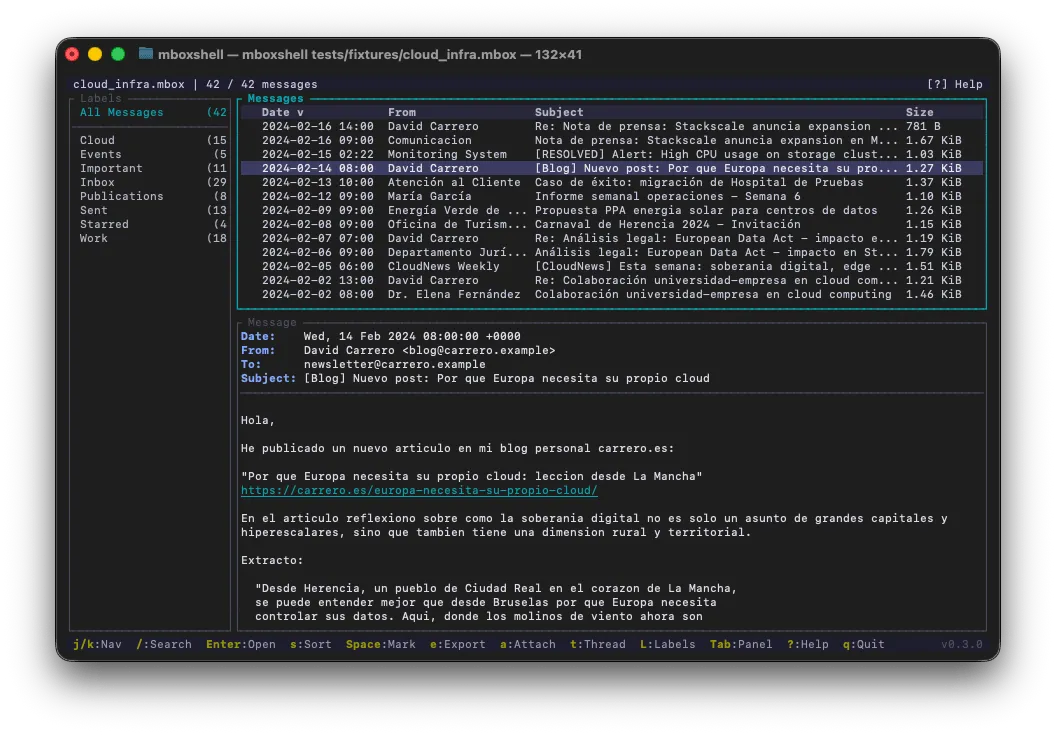
mboxShell running in a terminal, showing an MBOX archive with its message list, folders and reading pane.

A full MBOX toolkit in your terminal

Everything you need to work with huge email archives — reading, searching, threading and exporting — with no GUI and no cloud.

Any file size

A streaming parser with a 1 MB buffer opens 50 GB+ Gmail Takeout backups while keeping RAM around 500 MB.

Sub-second re-opens

A persistent binary index — verified with SHA-256 — reopens even the largest archive in under a second.

Field-based search

Filter with from:, subject:, date:, body:, has:attachment and label:, plus exact phrases and an OR that groups alternatives: a OR b c reads as (a OR b) AND c — in the TUI or from the command line.

Gmail labels & Google Groups

Detects X-Gmail-Labels and turns them into virtual folders you can browse and filter by. In a Google Takeout archive, each Groups mailbox appears under its own group name.

Conversation threading

Groups related messages into conversations with the classic JWZ threading algorithm, using Google's own conversation id (X-GM-THRID) when the mailbox carries one.

Export anywhere

Save messages as MBOX, EML, CSV, TXT or HTML, and extract attachments individually or in bulk.

Merge & dedupe

Combine several MBOX files into one, with optional deduplication so nothing is imported twice.

Full terminal UI

A ratatui-based TUI with three layout modes, vi-style navigation and shell completions for bash, zsh, fish, PowerShell and elvish.

Cross-platform & bilingual

A single ~5 MB binary with no runtime dependencies. Runs on Linux, macOS, FreeBSD and Windows, with an English/Spanish interface.

What's new

The three most recent releases. The latest, v0.7.3, shipped on September 4, 2026.

v0.7.3

September 4, 2026

The Mac app moved to a new domain

  • Documentation only: both READMEs and both manuals still pointed at mboxviewer.net, the former domain of the macOS app. They now name mboxviewerpro.com, and so does the repository's own project link.
Release notes v0.7.3

v0.7.2

August 22, 2026

Export a selection as a new mailbox

  • export --format mbox writes the selected messages into a single new MBOX. Until now a selection could leave as .eml, CSV, text or HTML — a folder of files — but never as a mailbox again, so there was no way to hand over part of an archive in the format it arrived in. Together with --query that is the whole delivery flow: filter a large dump (a Google Vault export, a Takeout archive) down to the messages that actually belong in the handover, and produce a mailbox holding only those.
  • A message read out of an MBOX is copied byte for byte, keeping its own From envelope line and whatever quoting the source used: rewriting the envelope could only corrupt an archive that was already valid. One with no envelope line — because it came from an EML — gets one synthesized, plus > quoting of body lines that start with From, without which the result is not a readable mailbox. The output is committed by temp file and rename, like the merge, so a failure halfway through never leaves a half-written mailbox under the name you asked for, and the source file is never touched. 7 new tests (241 in total).
Release notes v0.7.2

v0.7.1

August 20, 2026

Search queries that mean what you wrote

  • OR now has a precedence. It used to be a flag on the whole query, so a single OR anywhere turned every term into an alternative: from:alice OR from:bob subject:invoice did not mean "either sender, about invoices" — it returned everything from alice, everything from bob and everything whose subject said invoice, whoever sent it. On a 6,787-message mailbox that is the difference between 49 hits and 2,102. A query is now a list of AND-ed groups, each group a list of OR-ed terms, and OR is what puts two terms in the same group: a OR b c reads as (a OR b) AND c. There are still no parentheses.
  • after:X before:Y was impossible to express. The query held a single date filter, so the second one silently replaced the first and only before: survived — half of what you typed was dropped without a word. Date and size filters now accumulate, which also turns size:>1mb size:<5mb into a real band.
  • after: now includes its own day and before: still excludes its own, so after:2024-01-01 before:2025-01-01 is exactly the year 2024 — the half-open reading Gmail's operators use, and consistent with date:A..B, which was already inclusive. Both manuals and both READMEs document the precedence rule and the date bounds. 23 new tests (234 in total).
Release notes v0.7.1
Read the full changelog

One command away

mboxshell
$ mboxshell archive.mbox
# Open the interactive terminal UI
$ mboxshell search archive.mbox "from:jane has:attachment"
# Search straight from the command line
$ mboxshell export archive.mbox -f eml -o out/
# Export messages to MBOX, EML, CSV, TXT or HTML
$ mboxshell merge a.mbox b.mbox -o all.mbox --source-header
# Merge files — duplicates removed by default (--no-dedup to keep them), noting which mailbox each message came from
$ mboxshell attachments archive.mbox -o files/
# Extract every attachment at once

Install it

Grab a pre-built binary for Linux, macOS, FreeBSD or Windows from the releases page, or build it yourself with Cargo:

$ cargo install --git https://github.com/dcarrero/mboxshell.git

The open-source engine behind Mbox Viewer

Mbox Viewer for Mac and Windows grew out of mboxShell. The app wraps the same idea — reading MBOX files of any size, fully offline — in a polished native interface with search, labels, threading and EML support. Prefer the terminal? mboxShell is free and MIT-licensed.

github.com/dcarrero/mboxshell